I’ve not kept a consistantly updated blog in… never. They always die after a few years. That’s fine though. Nothing lasts forever, or at least that’s what I keep telling myself whenever I hear mumble rap.
I’m using this sort of as a cloud storage for my teaching materials. I do already have a google drive and several USBs filled with stuff, but I figured, “Hey! I worked hard over the years developing these ideas and philosophies so I should share them for free with anyone.”
As far as teaching goes I really enjoy it! I hope you do as well. A lot of variables go into that though… many of which are not in your direct control. If you were like me you received a week of training before you started your job as an assistant language teacher. From what I can remember the only useful thing I heard all week was, “Smile.”
The whole week of training they kept going through these books with really shitty cheap formatting with loads of lessons. Some of those were probably really great lessons, but it was too much. I didn’t know where to start and I shoved those books into a desk drawer where they still remain to this day, I assume… But it really pressured us to keep things fresh. Be a flood of new ideas of creativity with the start of each new day…
That is possibly the worst thing to do as an educator. My advice is figure out what the students enjoy and then use that repeatedly. Beat that horse until it’s unrecognizable, because as it turns out kids don’t mind doing the same thing over and over again. Really that should come as no surprise. Anyone who has played boardgames knows you don’t just play the game once and then never want to touch that game again. If you ever played Sim City you never just built one city and then instantly moved on satisfied to never build a second one. If you ever played Pokemon you never got bored after the first digital dog fight. You kept grinding that content until you caught all the damn pokemon.
Constantly introducing new games and activities will be detrimental in the long run. Explaining new rules cuts swaths out of your class time. If the students have new grammar that they have to practice, but they know the framework of the activity and lesson already, you can maximize the ammount of time they have to engage with the material. The only one and done lesson plans should be the ones that bomb. If you have a great lesson identify why it was good and cannibalize that for the rest of your career. It’s not to say you can’t come up with new stuff, but it’s better to do varying iterations of something that the kids enjoy, then confuse them every lesson with something new.
So… first post, this my first bit of advice to you, take it or leave it. I will now begin to upload worksheets and activities that have worked for me in the past. I teach mainly in junior high school, but many of these ideas could be adapted to teach all ages. If you have advice don’t keep it to yourself. If you have questions then ask.
Disclaimer… I’m using our school’s very old computers to write this blog, upload materials, and also create a lot of the worksheets. This computer is still running Windows XP. The interface sucks and sometimes it deletes large contents of what I’ve written. This post in fact originally contained a funny annecdote about my first day of school, but after multiple crashes and I’ve finally figured out how to sort of get this to work, but I am too annoyed to re-write everything I orginally had written. Maybe it’s for the best. It was kind of rambling.
So 2020 was super long, but I was pretty busy with figuring out new ways to teach while maintaining social distance. Luckily we got some help in the form of new technology.
This is a google slideshow I made to help educate ALTs and friends about the new Denshi Kokuban in classrooms. I used VRM models and OBS software to make the instructional videos.
This is a lesson I made for 3 year students. They have a target grammar structure they have to use, but they also need to use simple English to figure get information they may be missing.
No lesson plan for this, and the materials can be used in a multitude of ways besides this game in particular.
My 3rd years are lower level than is normal, but they still enjoyed the physical aspect of going from group to group asking for information.
This is a video of a slide show I made to instruct how to do this activity to the students. And you can also download the presentation if you use projectors or TV’s in your classroom.
This is an 11 page document. The first 10 pages all have 7-8 characters named, but all 10 are unique. Each character appears on 2 different pages. I have 9-10 groups in my third year classes this year. If you don’t have 10 groups then one page can be discarded without thought and all the characters will have at least one page with their names on it. Once you discard a second or third page you have to be careful that the discarded pages don’t feature the same named characters.
The 11th page is a master copy containing all character names. You can disregard the entire “Information gap” concept and just print this master copy for all the groups if you want. It is intended to be used by the teachers when checking the student’s answers.
PDF is the safest to print now. The word docs are there if you want to adjust things or rename things yourself.
Do you write your own lesson plans? At some point I was asked to write a lesson plan for the first time. And probably because I didn’t and don’t really teach off of already written lesson plans, I had no idea what a lesson plan would look like. I’m sure my first attempt was a mess. Just because you can do something well, doesn’t mean you can write a How To set of instructions to help someone else do it…
Like… it’s not hard to do it poorly…
So as someone who occasionally has to help “train” ALTs, and I use the word “train” extremely loosely, this year I was flooded with lesson plans. I’ll be honest… I didn’t look past the basic design of any of them. My brain just shut off when I opened them all up, they were such a hodgepodge of different styles it made me cringe. But that’s not because they were written badly or by people who don’t know how to make lesson plans. I’m sure they were all wonderful… Just it’s hard to look at something and judge scores of them when all of them are all different looking. It’d be like having a dog competition, but your definition of dog is anything that has 4 legs and and fur.
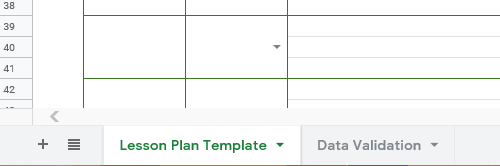
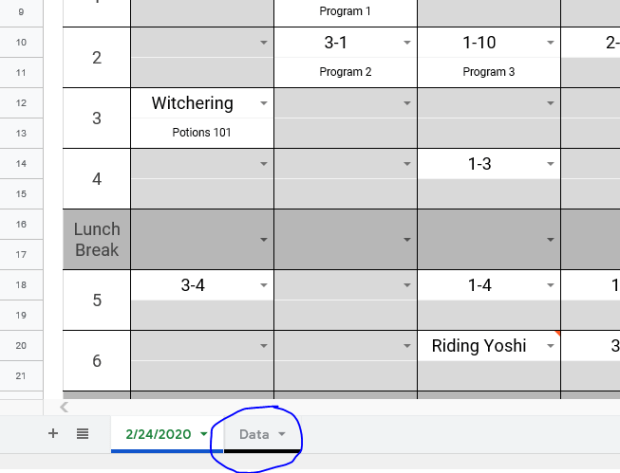
It’s a google sheet. There are 2 sheets included. The first sheet is the lesson plan template itself with some instructions on how to get started. The second is a ‘data validation sheet’ that also comes with instructions on how to use it.
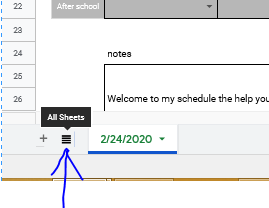
Bottom left to swap between the two. In the event you’ve never used Google Sheets or Excel. Has to be some of you, we all start from somewhere.
I hope it proves helpful for when you want to make your own lesson plans in the future. I would suggest that my own company adopt a standardized procedure in the future, but my suggestions are received about as well as Firefly was by Fox executives.
So… in the “social-distancing” era of ESL teaching how are you adapting?
Personally… I didn’t go back to teaching in classrooms until June 1st. You’d think I’d have a long time to strategize how to approach lessons going forward… but I also have a toddler. Excuses aside though I have massively changed my teaching style.
Really… every parent had very realistic expectations about working from home…
The teaching style that I developed over my time in Japan was centered on student’s teaching each other. Lots of group work and communication activities. I liked letting students get an objective that required them to get more information via verbal communication. So they would form questions, ask those questions, and then record what they learned. Then they would disseminate that data and share it.
Buuuuut… group work is not an option. Students are allowed to work in pairs, but desks have to remain around 60cm apart from each other. To be frank I think it is unnecessary. All the students are wearing masks. If we have COVID spreading the current precautions we are taking probably aren’t going to halt its spread. Students still hang on each other during breaks. They still talk in close groups and touch each other. They have to remove their masks to eat. They walk home together. They play and hang out after school and on weekends. I digress.
yeah… baby
With the social distancing handicap I’ve moved on towards using the very thing I’ve railed against for years. PowerPoint.
Now I’ve covered my issues with PowerPoint before and I won’t rehash those now. (Full disclosure I totally did write a lengthy rehashing, then read it, realized I probably have unhealthy issues and the 4 of you who will actually read would be bored so I deleted it…) But for all the problems I have with PowerPoint it can be an extremely useful tool, if used right.
Can I get this icon in cornflower blue?
I make heavy use of animations in my PowerPoint presentations. Here are some that I’ve made with corresponding worksheets. Basic premise is making activities based on Japanese quiz/game shows in style. So far student participation is 100%, though only because I make each row stand up. I don’t love these lessons, but the kids enjoy them so far and while speaking and active communication time is drastically cut only because 1 on 1 and conversation within groups are now not possible given the parameters necessitated by COVID19.
My 3rd year students missed the last month of school so the teacher asked me for an activity for them to practice using passive voice as it was confusing them. TBH I dislike passive voice and I think it’s importance is overstated by Japanese English curriculum.
Starting off we warmed up with this passive voice quiz. Students all stand. I read the verbs and they would raise their hands to say either the past tense past participle. Then I would reveal the answer by rolling the animation and the students would write it on their worksheets. After students answered we would play Rock-Paper-Scissors and if they won then they could pick a friend to sit down. If they lost then only the student who answered could sit.
Next is the quiz/game/activity PowerPoint. If you run through the slideshow it’s easy to see how I ran the activity because I explain it visually in the PowerPoint.
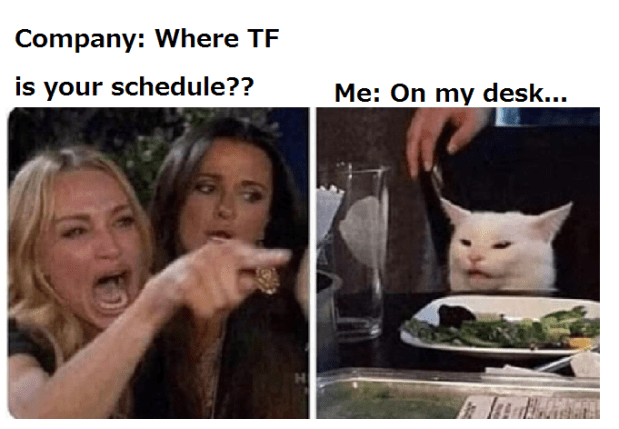
TL:DR My schools want to keep track of the lessons I’m teaching, my company wants the schools to fax them schedules. Trapped in the middle, I came up with an unofficial solution that makes me happy, but due to technical reasons I don’t use it, but you can take a look if you want.
This doesn’t seem like something you should have to think about, right? Your company and the school/BOE should be figuring this out and letting you know. But I got tired of being asked to be the middle man between my schools and my company. So I made an online schedule using Google sheets. Now the teachers could adjust my schedule weeks in advance. And my coordinator could see this in real time. If we used this then I’d no longer be being asked to tell the teachers to fax my schedule to my coordinator so she can email me a picture of the fax… But I was told that this would not work for the current system. So officially, I don’t use this myself.
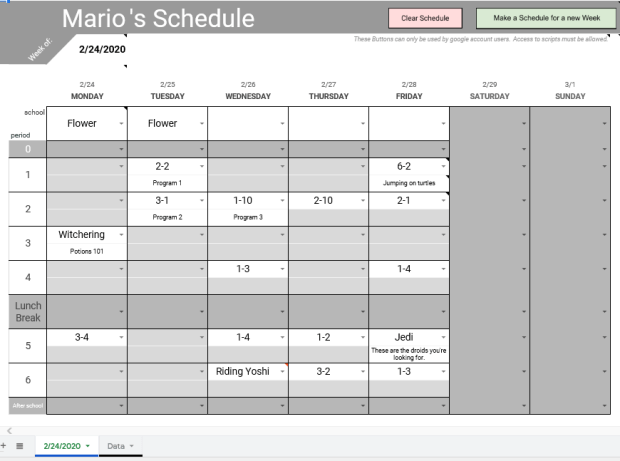
I’ve removed all the Japanese from this schedule, so that it is potentially usable for any teacher in any country. There are many notes littered around the schedule to help guide you in its use. You can remove the notes whenever by right clicking the cell. First here is the schedule: ALT Schedule.
Open it, and then save a copy to your own drive. You will need a google account to do this, but using the schedule itself won’t require any account or sign in. Just adjust sharing settings so anyone with a link can edit.
Main points
The schedule is customizeable.
The schedule is stored on the cloud and can be viewed and/or edited by multiple parties.
How to customize
First step. Go to the Data tab on the bottom left hand corner.
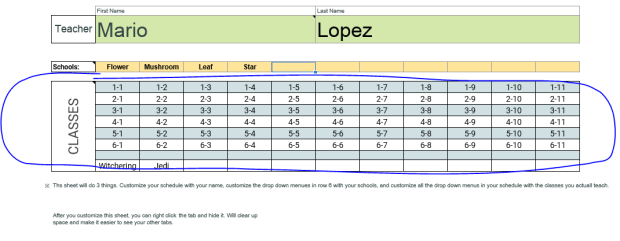
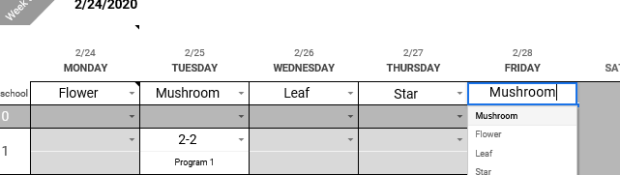
On the Data sheet enter in your Name, your school names, and the classes you normally attend. This will adjust your schedule by putting your name at the very top, the drop down menus in row 6 will have all of your schools, and your schedule drop down menus will be your commonly used classes. If you have less classes than I provided just select the cells with the classes you won’t ever use and press backspace on your keyboard. If you have a special needs class or something you often do like a conversation class, test prep, potion mixing, or something then manually input it and it will be added to your drop down menus. If your classes use a different ordering system, like Grade 1 Class A, Class B, Class C, etc. etc. etc. then you will have to clear the table and put in 1-A, 1-B, 1-C. The bottom line is whatever you put into the sheet in the classes menu will then appear on your schedule in the drop down menus.
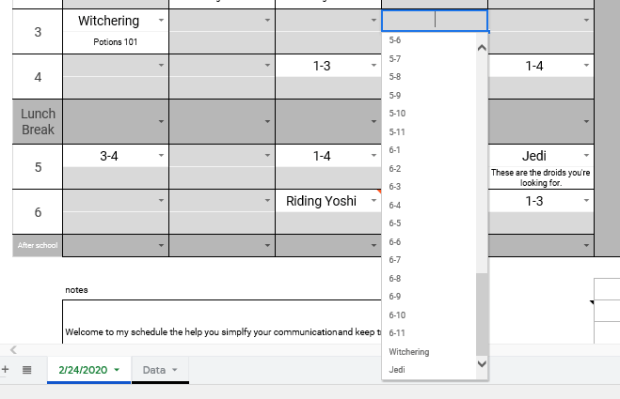
You’ll note I added Witchering and Jedi to the classes.
That will add them to my drop down menus on my schedule.
Keep in mind that the drop down menu items are set to appear in horizontal order on the Data sheet. I know that sounds confusing, but what it means is if you were to write your classes on the Data sheet like this:
1-1
2-1
3-1
4-1
1-2
2-2
3-2
4-2
1-3
2-3
3-3
4-3
Then the drop down menues would look like this:
1-1
2-1
3-1
4-1
1-2
2-2
3-2
4-2
1-3
2-3
3-3
4-3
If that’s how you would like the drop down to appear you can customize your classes like that, but it doesn’t make sense to me.
The cells under the drop down menus on your schedules are blank. You can write short memos here about the class contents. For more in-depth information, if you need to, can be written as a note or comment by right clicking the cell you wish to attach a note or comment to. Notes will pop up when your cursor hovers over the cell. Comments are unique because they will alert anyone who has a google account connected to the schedule and will also add a number to the sheet tab to denote how many comment threads are on the sheet. Comments can also be used to carry out conversations between users.
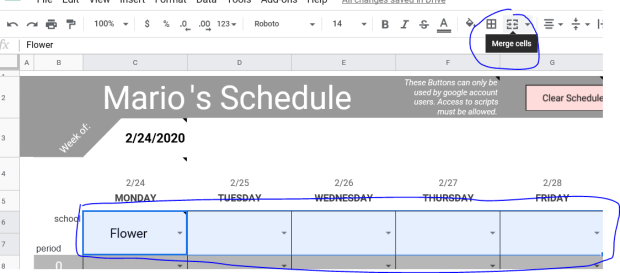
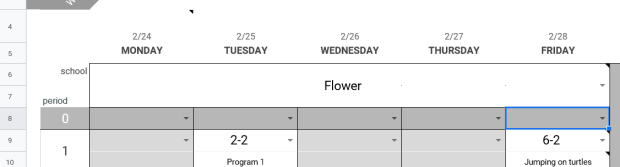
On your schedule you can merge and unmerge you cells in row 6 depending on how your schedule is arranged. For example, I go to one school per week, so I merge the 5 cells of row 6 like this.
Use the same button to unmerge the cells, but be careful. The school cells are actually rows 6 and 7 cells merged together. I did this in the event that a user may go to 2 different schools in one day. You can unmerge the single day and then you have 2 school cells for that day. But when you merge multiple days and then unmerge them, all of the cells will revert to being separated by both rows and columns. So you’d have to remerge them if you wanted. It’s more of an aesthetics thing.
The other ALT in my town has 3 schools that he goes to every week. School 1 he goes to on Monday and Tuesday, School 2 he goes to on Wednesday and Thursday, and School 3 he goes on Friday. He could merge the row 6 cells under Monday and Tuesday together, and do the same to the cells under Wednesday and Thursday.
Customize it to make it useful. If you have a very random schedule that varies from week-to-week just leave all the cells unmerged and fill in each day individually, it doesn’t take much time.
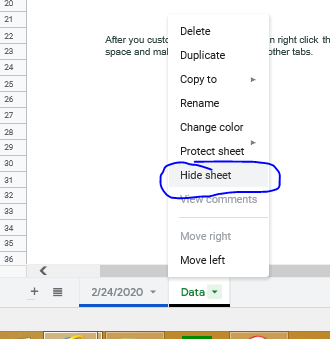
After you finish customizing your Data sheet I suggest you hide it.
Hidden sheets can still be accessed, but it’s not something you want to change often.
I hide my weekly schedule sheets after the week is over. It keeps the current week as the top sheet, and reduces the number of tabs I have to comb through. But, if i want to look back and previous weeks I still can.
Next Week
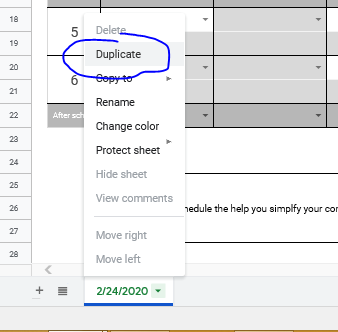
To make a new sheet for your next week of work is simple. Right click the tab of the sheet you wish to duplicate and the option pops up.
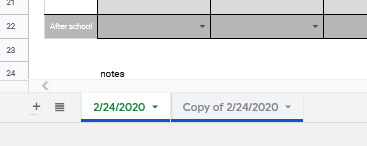
This will create an exact copy.
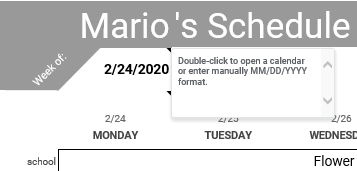
Switch to the copy, and change the date in Cell C3.
This will automatically update all dates and days on the the sheet. Double click the Copy of “ “ sheet tab at the bottom to rename it to the new start date. Select all the Cells and hit backspace on the keyboard to clear the classes and schools if you want.
Push My Buttons
I did make some buttons at the top of the schedule, but to use them you’ll have to allow the Google scripts access to your google account. It is the same as when using Microsoft Excel and enabling macros. The reason that Google warms you that that script is potentially dangerous is because they do not have control over what scripts people write. It’s like a company selling pens, but putting warnings on the pens that their company isn’t responsible for what the pens are used to write or draw. That being said running unknown scripts on your computer is a lot more dangerous for your computer than a pen someone’s using to write shitty Twilight fanfic. So I have actually removed all the script from this schedule. If you want to use these handy buttons then you’ll have to implement it yourself. Either way it will ask you for permission to run the scripts, but this way you can actually see what you’re running and know that I’m not some bored hacker trying to steal all your cat meme ideas.
I’m prouder of this than I should be…
In Cell J2 I have stashed this script:
function NewSheet() {
  var spreadsheet = SpreadsheetApp.getActive();
  spreadsheet.getRange('A1').activate();
  spreadsheet.duplicateActiveSheet();
  spreadsheet.getRange('C6:I22').activate();
  spreadsheet.getActiveRangeList().clear({contentsOnly: true, skipFilteredRows: true});

  };

function ClearSheet() {
  var spreadsheet = SpreadsheetApp.getActive();
  spreadsheet.getRange('C7:I22').activate();
  spreadsheet.getActiveRangeList().clear({contentsOnly: true, skipFilteredRows: true});
};
These are the two functions you need for both buttons. One is named NewSheet and the other is named ClearSheet. In the merged Cells G3-I3 I have detailed instructions on how to copy and paste this script to use it.
If you prefer you can record your own macros though. These instructions are in Cell J3.
These two buttons already have the scripts assigned to them under NewSheet and ClearSheet. So copy pasting or recording macros under these names will make the buttons work automatically. With a single click of the mouse you can clear all of your scheduled classes or make a new blank sheet for next week. But if you don’t want to use these buttoms right click to select and delete them.
Sharing the Schedule
So who you share your schedule with is up to you. Because I made this and my company did not, technically it’s not company policy. But both my coordinator and my teachers were initially happy with the conceptMost teachers are tech savy enough to appreciate the simplicity and ease of use. Honestly, they’re just relieved to not have to print out the schedule and fax it every week. Elementary schools are different because schedules are more rigid and set, but JHS the class schedules tend to change randomly and often. I don’t get a finalized schedule until mid week sometimes. And daily changes are the norm. I keep a written schedule on my desk for all the teachers to see, but the using an online schedule would let me update changes in real time so my company could see. You could even put a shortcut to the schedule on a school computer to make it easy for the teacher to access.
You can email the link to the teacher of course. I usually shorten the link with TinyUrl or something. But if internet access is restricted then emails might not work. If this is the case I shorten the link with TinyUrl. Then just type the link in the browser. Alternatively, you could type the link on a Word doc, save it to USB. Then open the doc on the computer and Ctrl+click the link to open your schedule.
To make the shortcut on the desktop just click and drag the icon in the URL bar to the desktop and then rename it.
If you can help me with my Java. I would like for the NewSheet script to also advance the date and rename the sheet. I cannot figure out how to make it advance the date though… I have gotten the sheet auto rename to work though.
This is an example of my most heavily used activity. The details will differ slightly, but essentially, I want the students to
Ask a question
Listen to the answer
Remember the answer and share that answer with their group
Understand the answer as a group
Write out a sentence using the information they learned from the answer
Relay that information to a 3rd party.
This lesson is marked for the end of JHS first year, so students by this point should be comfortable enough talking to you 1-on-1, and if they’re not then this is the practice they may need. I don’t always make the students ask questions and listen to answers individually, but when the pattern is so cut and dry like this with zero variables for the question I believe it is more than fair to expect them to be able to solo the Q&A.
But you can alter the methods and worksheets as you see fit.
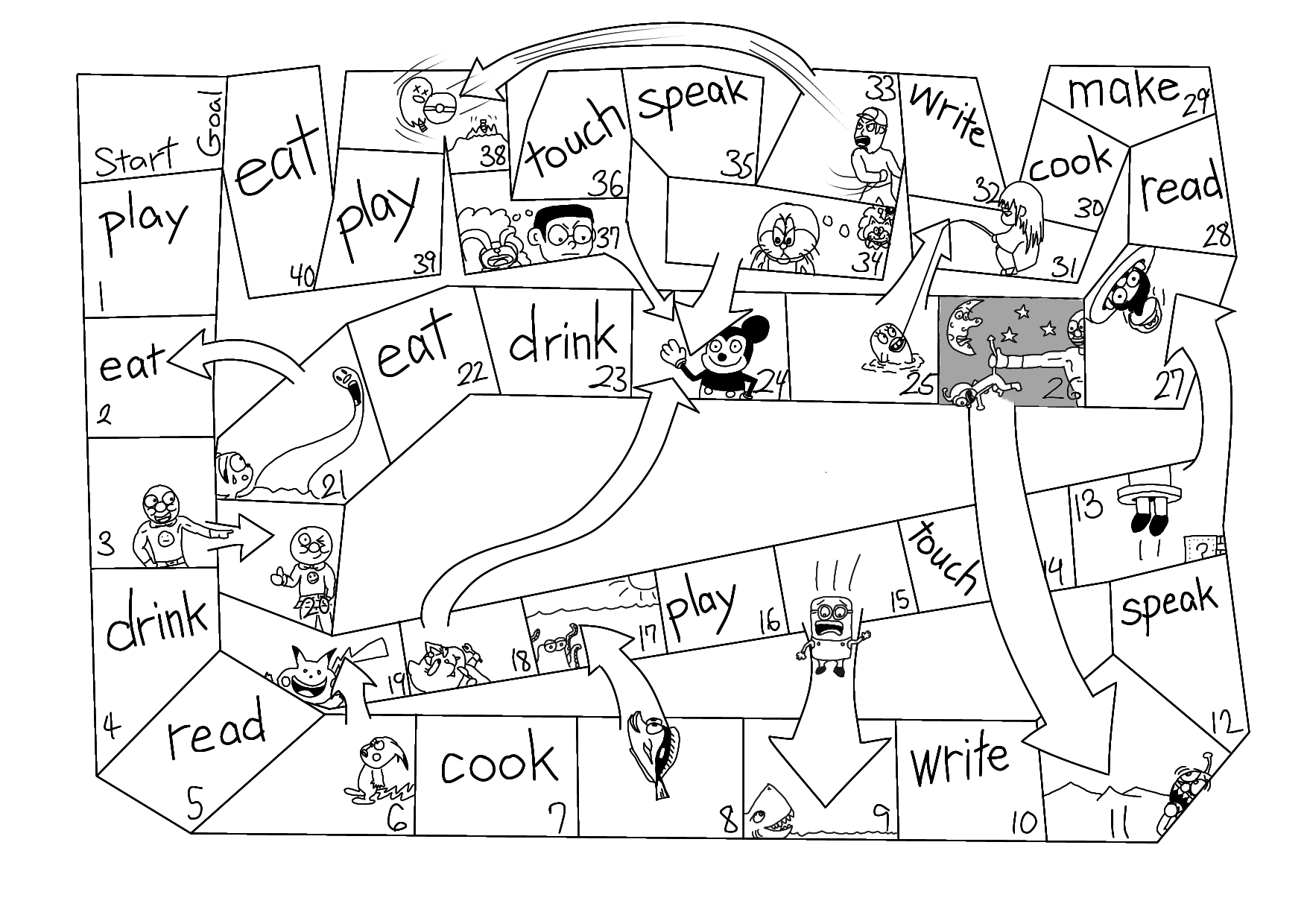
This is a follow up lesson to the I can snakes and ladders lesson plan. It uses the same activity and game, but grammar is changed to question form, and the game is changed due to this. I will provide the lesson plan, the worksheet, and a new snakes and ladder game sheet modified to slow down the game some.
Hello! Happy New Year! 2020 is up and so far Australia is on fire and we lasted 6 days without a new war!
I’ve been using this for decades… just much less handsomely…
Kind of feel like it is pretty much in line with my expectations though.
English Camps…
TL:DR Don’t forget to manage your workloads. Be pragmatic and think everything through. Be prepared with alternative plans.
Did any of you try to make a little extra yen on the side over the winter holidays by joining an English camp? I did! It was pretty good all things considered. The level of the students’ was pretty incredible in the high school camp I joined. They used mostly English to discuss and debate at a level I’ve not seen before, and this is my third time at this particular camp. It’s very popular though with over 320 students applying to join and only 71 allowed to attend. (I don’t know why it was 71 and not a nice clean round number… that annoyed me, lol.)
But, and there’s always a but… probably because I’m not very tactful and a bit of an arse, there was quite a large bit of room for improvement.
What causes bad camps
Looking back at the camps I’ve joined the best ones are always the most prepared. Duh, right? But I suppose it’s not super easy to prepare 3-5 days worth of materials for dozens of students, explain those materials to the ALTs and staff working, make sure all the materials are prepped, and then maintain the schedule.
And for those of you who have joined a poorly executed camp, it probably felt like the entire thing was an afterthought scrapped together like Mary Shelley’s monster. There is a reason for that though, and it’s not always your camp leader and company’s fault. It is often largely out of their control. The culprit here is often the BOE. I have led only one camp myself and the BOE didn’t tell us we had the contract officially until 14 days before the camp. Approval of the financials didn’t get finalized until a week before. They must think that after a camp is decided a trained elite English teaching force is released to quickly and efficiently manufacture a finished product working around the clock. This is not the case. Your camp will probably be created by 1-2 people. My camp went very well, but that’s because I’m OCD, pragmatic, and apparently I work fast. And my support staff, (one reliable hard working lady), printed everything I made and organized it well.
Advice No. 1, take care of your crew
My first advice to anyone leading a camp for the first time is to coddle your teachers that are working under you. Don’t overload them with all the minutiae, tell them what they need to know, what they need to do, and make it simple. The more teachers you have the simpler you have to make it. But possibly, and more importantly, don’t overwork them. This is especially important for overnight camps. The first overnight camp I attended we worked 14-17 hours per day. The pay was roughly 14,000 per day. For me, this was unacceptable. If I am going to ask people to do a week’s worth of work in 3 days then they’d have to get paid more than the BOE and the company are willing to part with, so, as the leader it’s on you to manage the workload to be fair and efficient. Most new camp leaders are zeroed in on the student experience and panicking because they have so little time to do so much that they don’t even realize that they are essentially the boss.
Give the teachers breaks. Are the students taking a practice test? You don’t need all your teachers to administer the test, let them have an hour off. Are the student’s making a presentation? Tell the teachers to at some point take a 15 minute breather during that time (important point for this is to make sure they don’t all do it at the same time, you can’t leave the students unattended). After dinner? Your teachers are finished! Done-zo! Fini! But it’s an overnight camp… they have to stay on the premises… what are they going to do? They’re gonna probably hangout with their kids, playing games and stuff, helping them finish their speeches or presentations, just talking. It’s important to encourage your teachers to do those things in their free time, BUT emphasize that it’s totally up to them, just the fact that it is optional takes such a load off. Your teachers will happily still be working… but you’ve done it in a way that makes it more relaxed and they won’t tear you apart when they write their reviews afterwards.
Hallmarks of good camp leader
Over the camps I’ve attended the best camp leaders (MC) are the ones who are one of two things, sometimes both.
A. They are showman (or show-women, but now that I think about it I’ve never had a camp MC who was female, which seems to point to a larger social issue). They can engage, they bask in being the center of attention.
B. They are masters of the pithy speech. They don’t use ten words when three will suffice. They don’t start and stop sentences. They don’t go off on tangents. They explain stuff to both students and teachers with precision.
I am not A. I am B. I am fairly strong at public speaking, but I think it is easier for A type to learn to incorporate B type than vise versa. But I think it is important to recognize what you are and are not capable of, don’t be afraid to play to your personal strengths and capitalize on the abilities of others.
Personally my percentage is pretty far to the Swanson…
Doors and Corners
A perfect camp, I’ve never seen, but my last bit of advice I’d like to Expand on is, “Doors and corners, kid. That’s where they get you.” (If you get this reference you rock beratna/sésata).
Lay out your schedule. Take note of the pacing, breaks, linked activities, solo activities. Then make each activity. As with your normal lesson planning think it all through thoroughly. Just because you’ve used it in lessons in your school successfully doesn’t mean your teachers will understand how to implement it or the kids will understand how to do it. Think back to when you first started. Identify fail points, choke points, and alternative methods. How many students are there. If it’s more than a standard class size how will you need to adjust? Just think critically for goodness sake. We had one communication where students roll dice to determine what questions they would ask, divided like this: 1-4 pick from question pool A, 5-8 pool B, and 9-12 pool C. And they gave us two 6-sided die. You see the issue right? It’s impossible to roll a 1. This wasn’t a huge issue, but my kids noticed it on their own.
Little mistakes like that slipped through and of course that precipitated much larger issues arising due to not being pragmatic when coming up with activities. First ask, “Can I do this?” Then ask, “If I was stupid, could I still do this?” Parts of the camp were literally impossible to do because they didn’t think things through. When that happens you have a critical failure across all teachers and groups, and then all teachers will individually come up with their own separate solutions to fix the problem or they will stop and just be stuck. So then every single group could potentially have done different things or nothing at all. The variables expand exponentially then. Doors and corners kid…
P.S. All materials should be converted to PDF form. There were printing errors due to some materials being made in powerpoint or something, which honestly made no gorram sense…
P.P.S. Don’t get cute and try to rename stuff. Maybe you think ALTs should be called Assistant Speech Supporters. You think all ALTs in Japan should be reclassified as ASSes. So now you’re lead of a camp and you insist on using your new personal acronym. Well you’re gonna confuse everyone that isn’t you. Your actual ALTs, your staff, your students… It adds one more pointless variable. Call your ALTs either teachers or ALTs.
Or at least your camp…
P.P.P.S. I was tasked with making 2 large activities for this camp, one of them I’ve done in the past, the other I created for the first time. Because the particulars of the new activity were set by others, I had to work within a framework and it was a fairly complicated activity. To explain the activity to both teachers and students. I made an animated PowerPoint presentation. It worked splendidly. I would highly recommend it. That time I invested paid out dividends when it came time to try the activity. Just one word of warning. Another ALT at this camp saw my PowerPoint video, decided to also use PowerPoint, but when it came time for him to do it, they didn’t have the computer and projector set up properly. So that ate up a lot of time getting it to work. That was the fault of the support staff to a degree, but he should’ve been aware that technical difficulties are always a real and present danger. When it came time for me to use the computer and projector I told the staff to have things ready before I started. Doors and corners, eh.
This is simplified version of one of the activities I was in charge of. Teachers actually recived a video like this before camp that explained their role thoroughly. This is a video of the student version. Each slide explained slowly to everyone.
In transparency, this event actually had a very bad error. Of the 14 locations, one of the hint cards given to the students was duplicated onto the wrong key. So one of the locations had no hints and one of the locations had 2 hints. But, it didn’t ruin the event… why? I planned some redundancy into the event with each group’s ALT carrying a master list of all the hints, keys, locations, and codes. So each group, as they encountered the problem was able to sidestep it. Phew… Experience teaches you to be ready for things to go wrong.
My events weren’t perfect. One large issue happened during this amazing race activity. However, I had built in redundancy that let each group’s ALT identify problems and solve them on their own.
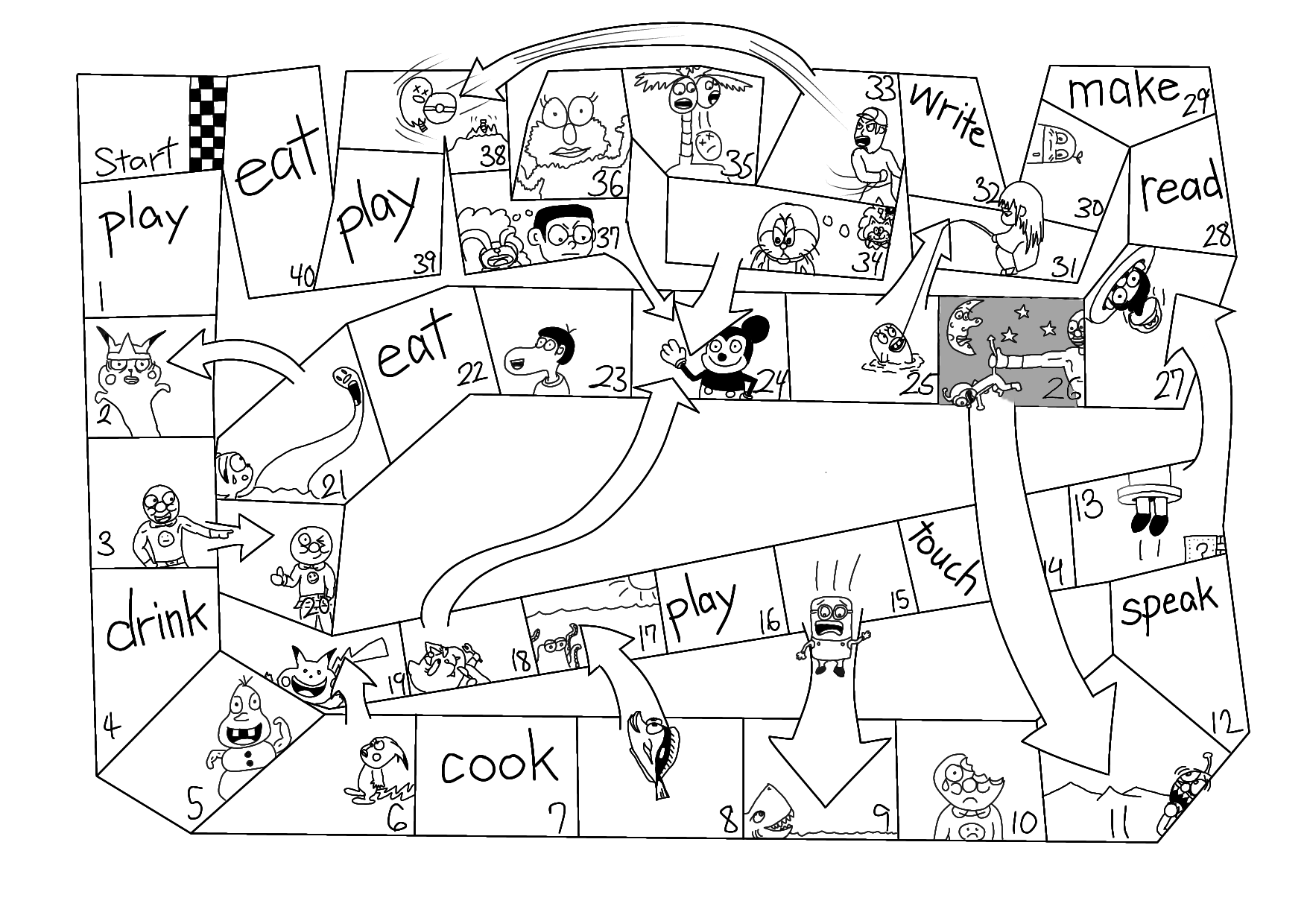
This is a kind of lesson I do with snakes and ladders that keeps the students working in groups, but also frequenly having the teacher’s check their work. It works fairly well in even the most difficult classes I have.
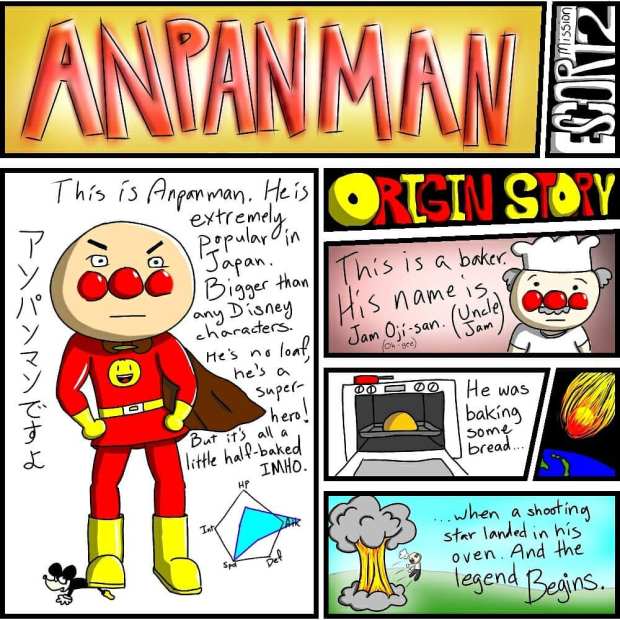
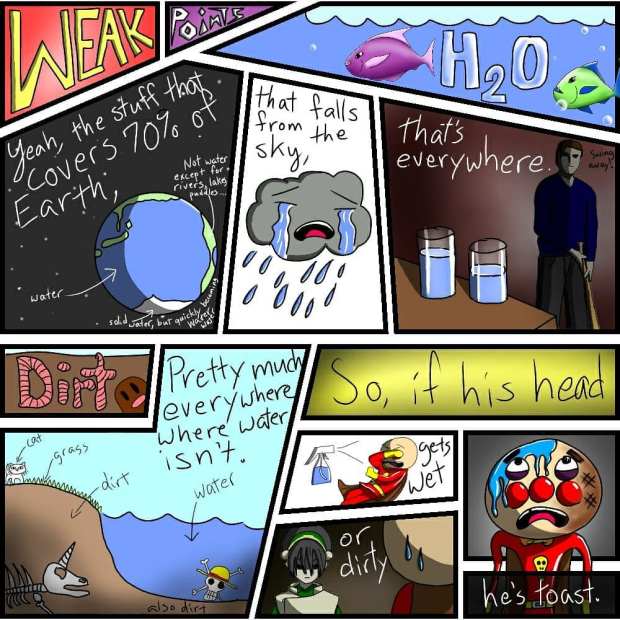
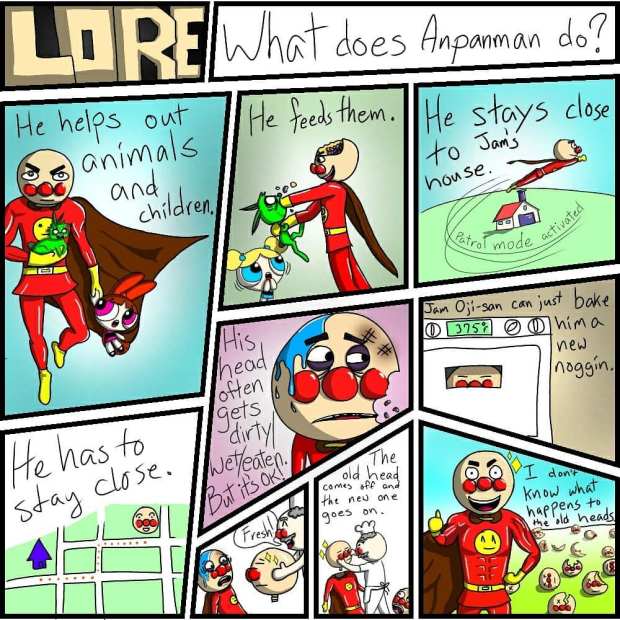
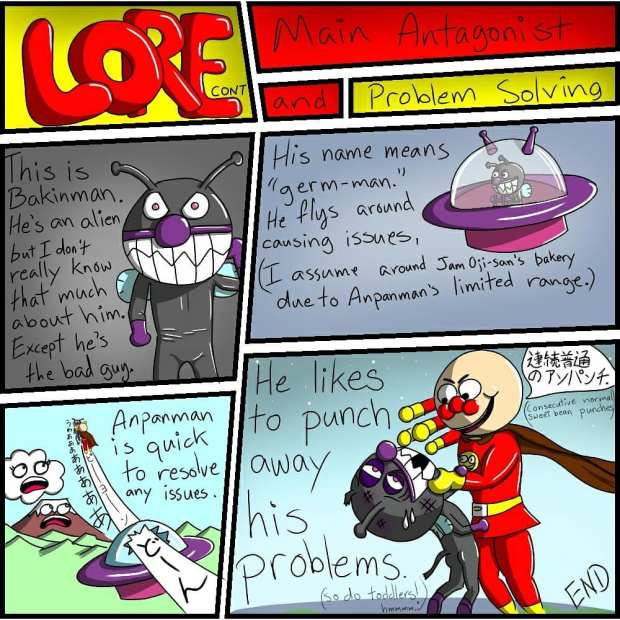
I really love Anpanman. It’s really pretty deep if you think about the premise. He’s not a great overpowered hero, but he is kind. He has strength and can fly, but his greatest power is giving up bits of himself to help and comfort others, all the while growing weaker in the process.
He’s also really easy to draw. It gives me flashbacks to my doodles of Kenny in my JHS notebooks many many year ago. My students really enjoyed my funny verisons of the bean stuffed crusader so I use him for a lot of illustrations. You’ll see him often in my games and worksheets, and my overall sense of humor follows a very evident pattern that I inherited from my father and growing up in the 90’s.













 ALT(er)native Teaching